Case study 02 · Business intelligence
From ERP records to clear action.
A customer-facing decision layer that converts ERPNext transactions into live operational, financial, and P&L intelligence—then explains the problem, likely impact, and next action behind each important signal.
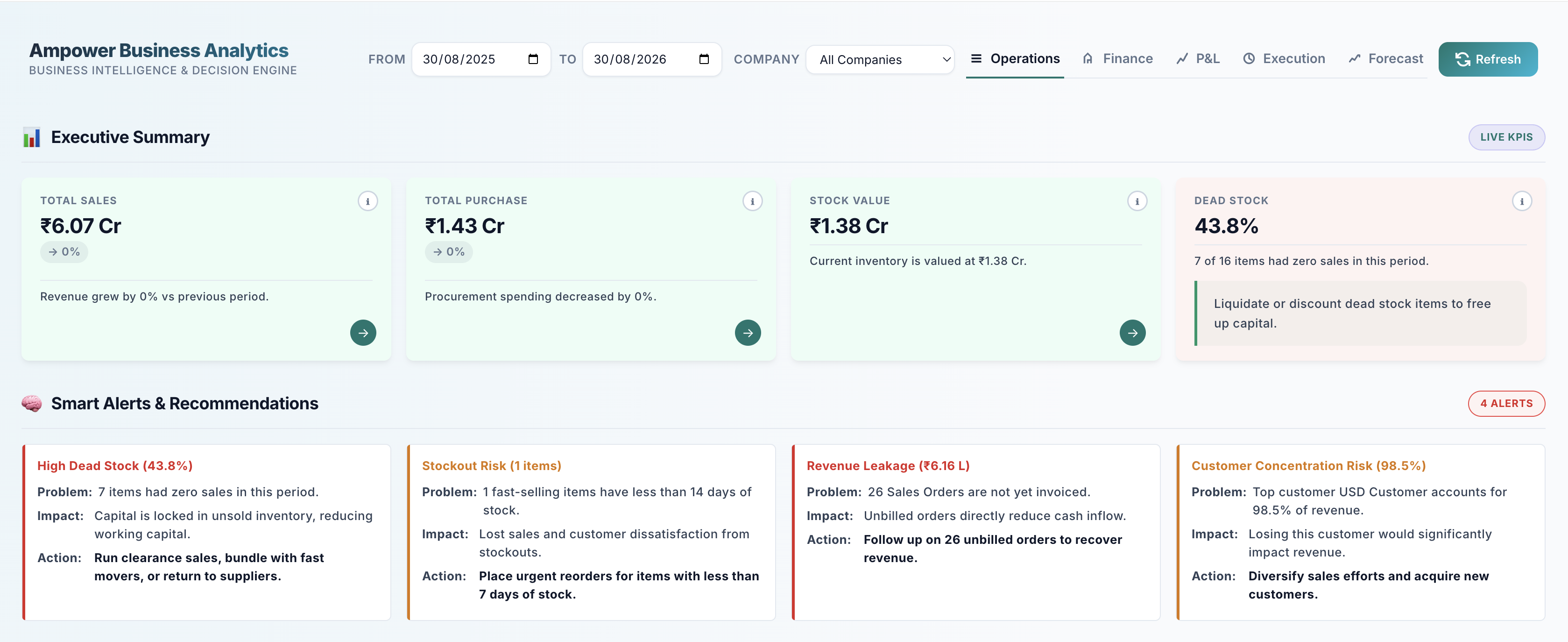
Operations / Executive summaryDecision-ready view
01 / Context
ERP systems store events. Leaders need decisions.
Sales, purchases, stock, payments, and ledger entries were available—but distributed across specialist records and reports.
The core problem was not a lack of data. It was the distance between a transaction and the business question someone was trying to answer.
The platform needed to unify operational health, cash management, and profitability without creating a new source of truth. Every KPI had to remain traceable to ERPNext records, support drilldown, respond to shared filters, and make risk understandable to people who did not write the underlying query.
02 / Product principles
Designed for questions, not decoration.
The dashboard was structured around the next decision a user needs to make after seeing a number.
One shared context
Date range and company filters apply across the platform, while P&L adds cost center, project, and time granularity.
Explain the number
Info views expose formulas, source DocTypes, fields, trend logic, and health thresholds for each KPI.
Reveal the source
Slide-in panels connect summary cards to invoices, suppliers, customers, items, and comparable alternatives.
Recommend action
Signals are expressed as a problem, business impact, and next step—not left as an unexplained red badge.
03 / Architecture
A decision layer, not another data silo.
The product reads directly from ERPNext transactional data and exposes dedicated backend engines to one interactive Frappe interface.
From transaction to decision
01ERPNext recordsInvoices, orders, stock, payments, and ledger entries
02Query enginesFiltered SQL and document aggregation
03Whitelisted APIsOperations, finance, and P&L endpoints
04KPI logicRatios, aging, risk scoring, and trends
05Insight rulesThresholds, concentration, and anomaly detection
06Frappe interfaceCards, SVG charts, gauges, and panels
07User actionInvestigate, follow up, reorder, or correct
Source of truth: ERPNext transactional DocTypesExternal dependency: None required for analytics
04 / Information architecture
Three modes, each built around a job.
A shared shell keeps navigation and filtering consistent while each mode gets a purpose-built data engine.
Operations
Daily business health across procurement, inventory, sales, fulfillment, and returns.
Executive KPIsSupplier dependency & riskDead stock & stockout riskConversion & revenue leakageOrder-to-cash cycleReturn quality
Finance
Cash-management visibility for amounts owed, amounts due, collections, and working-capital timing.
Receivables & payablesCash and bank balanceNet cash flowAR / AP aging bucketsSix-month trendsCash conversion cycle
Profit & Loss
GL-based profitability with flexible period, company, cost center, and project analysis.
Revenue, COGS & expensesGross and net profitMargin & expense ratiosTime-series trendsAccount breakdownsAnomaly-driven insights
05 / Decision design
Every alert completes the thought.
The interface uses explicit rules and statistical signals. It is intentionally transparent about why an alert exists.
Problem
Name the condition in plain business language: dead stock, revenue leakage, supplier dependency, or a fulfillment delay.
Impact
Explain why the condition matters—cash tied up, sales at risk, customer dependency, or slower order-to-cash movement.
Action
Give the user a useful next move: follow up, reorder, diversify, discount, return, or inspect the underlying records.
06 / Logic
Business meaning backed by source-level formulas.
The calculations stay close to their operational source so users can inspect how a KPI was produced.
KPIPrimary sourceCalculation or interpretation
Total salesSales InvoiceSubmitted invoice value in the selected period, with period-over-period trend
Dead stockItem + Sales Invoice ItemEnabled stock items with zero sales in the period
Revenue leakageSales OrderValue of orders not yet fully billed, excluding cancelled or closed documents
Supplier riskPO + Purchase ReceiptWeighted delivery delay, price variance, and purchase concentration
Cash conversion cycleInvoices + Bin + GL EntryDSO + DIO − DPO with safeguards for zero COGS and extreme values
Net profitGL Entry + AccountRevenue less COGS and operating expenses using account classification
07 / Interaction
Summary first. Evidence one click away.
Six product views cover the executive summary, procurement, inventory, sales, finance, and P&L. Open any image to explore the complete gallery.
08 / Engineering
Built as a product inside the system of record.
The implementation keeps deployment, permissions, filters, and operational context inside the existing Frappe/ERPNext environment.
Purpose-built APIs
Separate whitelisted endpoints for operations, finance, and P&L keep each data engine focused and independently maintainable.
Native interface
JavaScript, HTML, CSS, SVG charts, gauges, status badges, modals, and side panels form one responsive Frappe Page.
Transparent signals
Business thresholds handle operational alerts while z-score analysis detects recent expense anomalies in P&L trends.
No duplicate warehouse
The analytics module reads directly from ERPNext DocTypes; no external API or machine-learning service is required.
The central idea
A dashboard earns trust when every signal leads to evidence and action.